The best Reel editing app is usually the one already on your phone that exports without a watermark. For most creators that means a free mobile editor, and in 2026 the strongest free option comes from Meta itself. A paid app or a desktop editor earns its place only in specific situations: you start from templates, you need tighter brand control, or you’re cutting Reels out of long recordings.
This guide compares eight editors by those situations. Prices and free-plan limits were checked on official pages and in the US and India app stores on November 4, 2026.
Key Takeaways
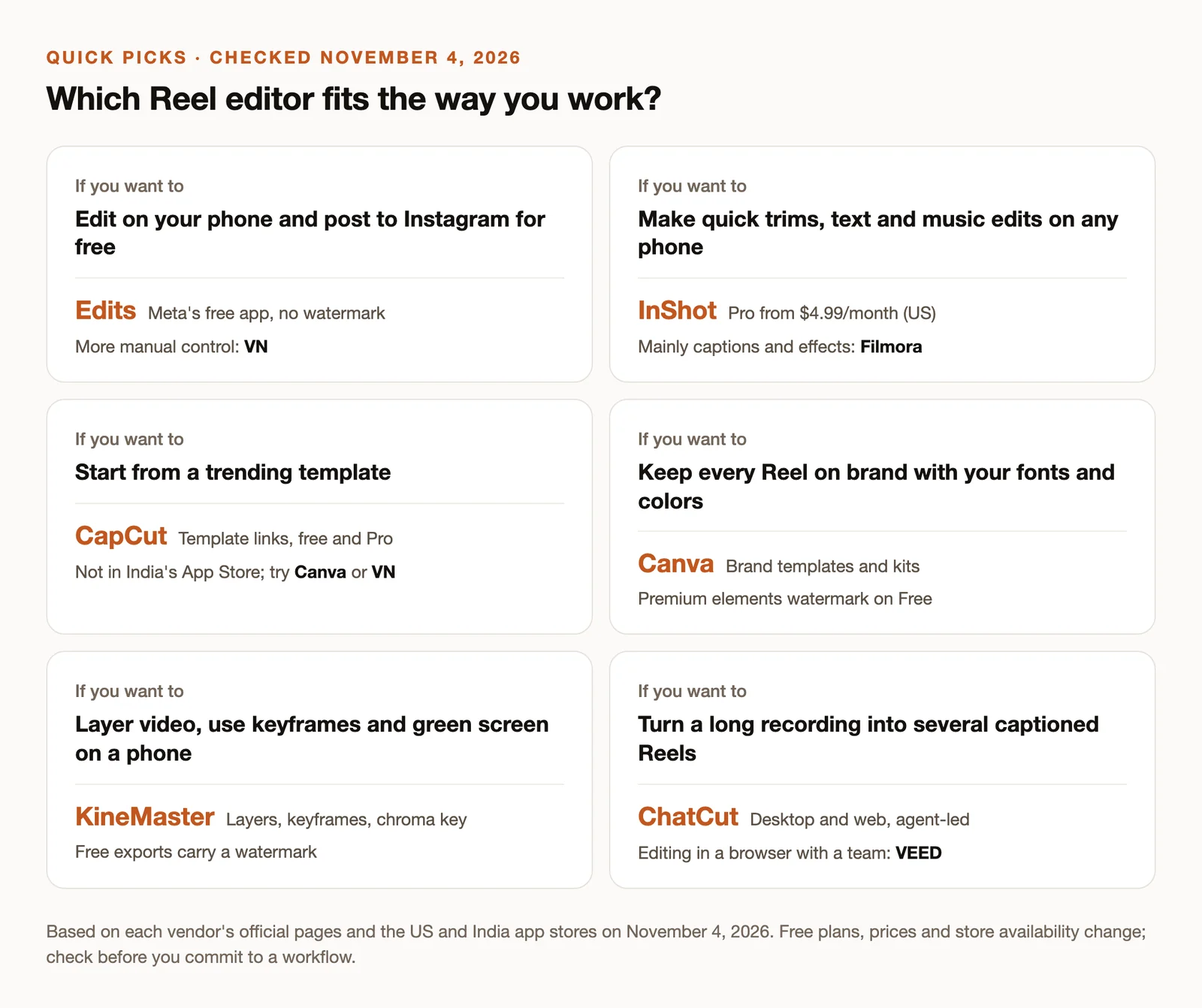
- Edits, Meta’s own editor, is free, adds no watermark, and posts straight to Instagram. Start there if you edit on a phone.
- VN and InShot are the best free and low-cost alternatives when you want more manual control or a lighter app.
- CapCut still has the template ecosystem, but it isn’t in India’s App Store, and some templates and exports need Pro.
- Canva suits brand-consistent Reels; KineMaster suits layered edits on a phone.
- ChatCut and VEED are for computer workflows: turning long recordings into several Reels, or editing in a browser with a team.
- Before you commit, export a 30-second test with your own footage and check the watermark, resolution and captions.
Best Reel Editing Apps at a Glance
| App | Best for | Platforms | Free plan | Paid from (US) |
|---|---|---|---|---|
| Edits | Free editing that posts to Instagram | iOS, Android | Free, no watermark | No paid plan found |
| InShot | Quick trims, text and music | iOS, Android | Free download, in-app purchases | $4.99/month or $19.99/year |
| VN | Multi-track editing on a phone | iOS, Android | Free, no watermark per VN | Pro in-app purchase |
| CapCut | Templates and trend formats | iOS, Android, desktop, web | Free editing and templates; some exports need Pro | $19.99/month or $179.99/year |
| Canva | Branded templates | Web, mobile, desktop | Free; premium elements watermarked | $18/month or $144/year |
| KineMaster | Layers, keyframes, green screen | iOS, Android | Free with ads and watermark | $8.49/month or $49.99/year |
| ChatCut | Long recordings into several Reels | macOS, Windows, web | Manual editing, transcription and captions; 60 min of cloud exports | $25/month (100 credits) |
| VEED | Browser editing with a team | Web | 720p with watermark, per VEED | Per seat; check current pricing |
Prices are the vendors’ listed US prices on November 4, 2026. App store prices vary by country and offer, and listed prices are not guaranteed for your account.
How We Chose These Apps
We started from the searches people use to find this page, mostly “best reel editing app” and “best reel editing app free”, and from the apps that recur across the guides ranking for them. Then we checked each candidate against its official website, help center and store listings in the US and India. We left out apps that have been discontinued, and we didn’t carry forward old prices from other lists.
This revision is desk research, not a hands-on benchmark. We didn’t run the same footage through every app, so this guide doesn’t rank caption accuracy or export speed. Where a free-plan limit isn’t published, we say so rather than guess. ChatCut publishes this guide and appears in the list, in the situation it’s actually built for.
The 8 Best Reel Editing Apps
1. Edits: Best free Reel editor for Instagram
Edits is Meta’s video editor for creators, launched in April 2025. It has a frame-accurate timeline, automatic captions, green screen and cutouts, overlays, audio enhancement, and direct publishing to Instagram with performance insights. You sign in with your Instagram account.
Why pick it: it’s free, Meta’s store listing advertises watermark-free exports up to 4K, and there’s no paid plan to upgrade into. If you film on your phone and post to Instagram, it removes most reasons to pay for anything else.
Watch for: the 10-minute limit you’ll see mentioned applies to recording inside the camera, not to editing or uploading. It’s built around Instagram, so if you also publish elsewhere, check the export suits each platform.
2. InShot: Best for quick edits on any phone
InShot is a light, simple editor for fast social edits: trimming and merging, automatic and bilingual captions, speed curves, keyframes, picture-in-picture, and music. It runs well on older phones.
Why pick it: when your Reel is one or two clips, text and a track, InShot gets you there with the fewest taps. Pro is inexpensive: the US App Store lists $4.99 a month or $19.99 a year.
Watch for: the free plan’s exact export limits aren’t published on the official listing, so export a test before you rely on it. The prices above are one storefront’s offer; Android and other countries can differ.
3. VN: Best free manual timeline
VN gives you a real multi-track timeline on a phone: keyframes, speed curves, automatic captions, beat-synced templates and LUT import, with exports up to 4K at 60 fps on supported devices. VN’s site describes editing without a watermark.
Why pick it: it’s the closest thing to a desktop editor in your pocket without a subscription. It suits creators who know what they want and don’t want templates making decisions for them.
Watch for: VN sells Pro and credits in the app, and the store doesn’t label how long each purchase lasts. Don’t assume every feature is free forever; check what you actually use.
4. CapCut: Best for trend templates
CapCut runs on phones, desktop and the web, and its templates are how many Reel trends spread: open a template link, swap in your clips, export. It also has captions, audio tools and a full timeline.
Why pick it: if the format you want to copy already exists as a CapCut template, nothing is faster. See how to recreate a viral video style for what to do when it doesn’t.
Watch for: three things. CapCut wasn’t listed in India’s App Store when we checked, so it’s not an option for many readers in India. Pro costs $19.99 a month or $179.99 a year in the US, subject to your account and region. And CapCut’s watermark help explains that clean exports depend on using free assets; Pro assets, some templates and some export settings need a subscription.
5. Canva: Best for brand-consistent Reels
Canva treats a Reel like any other design: templates, brand fonts and colors, stock media, text layouts, drag-and-drop assembly. It works in the browser, on phones and on desktop.
Why pick it: for small businesses and social teams, keeping every Reel on brand matters more than advanced editing. Canva makes that the default.
Watch for: content made with free elements exports cleanly, but premium elements carry a watermark on the Free plan. Canva Pro is $18 a month or $144 a year. It’s a design tool first; frame-precise cutting is easier in a dedicated editor.
6. KineMaster: Best for layered mobile edits
KineMaster has long been the phone editor for people who want layers: multiple video and image layers, keyframes, chroma key, captions and exports up to 4K at 60 fps.
Why pick it: green-screen composites, picture-in-picture reactions and keyframed motion are all practical on a phone.
Watch for: the free version shows ads and adds a watermark; Premium removes both. The US App Store lists Premium at $8.49 a month or $49.99 a year, among several plans.
7. ChatCut: Best for turning long recordings into Reels
ChatCut is an AI video editor for macOS, Windows and the web. It’s not a phone app, and it isn’t the right tool for a 15-second clip you filmed this morning. It’s built for the job phone editors handle worst: finding several good Reels inside a 40-minute podcast, interview, webinar or livestream.
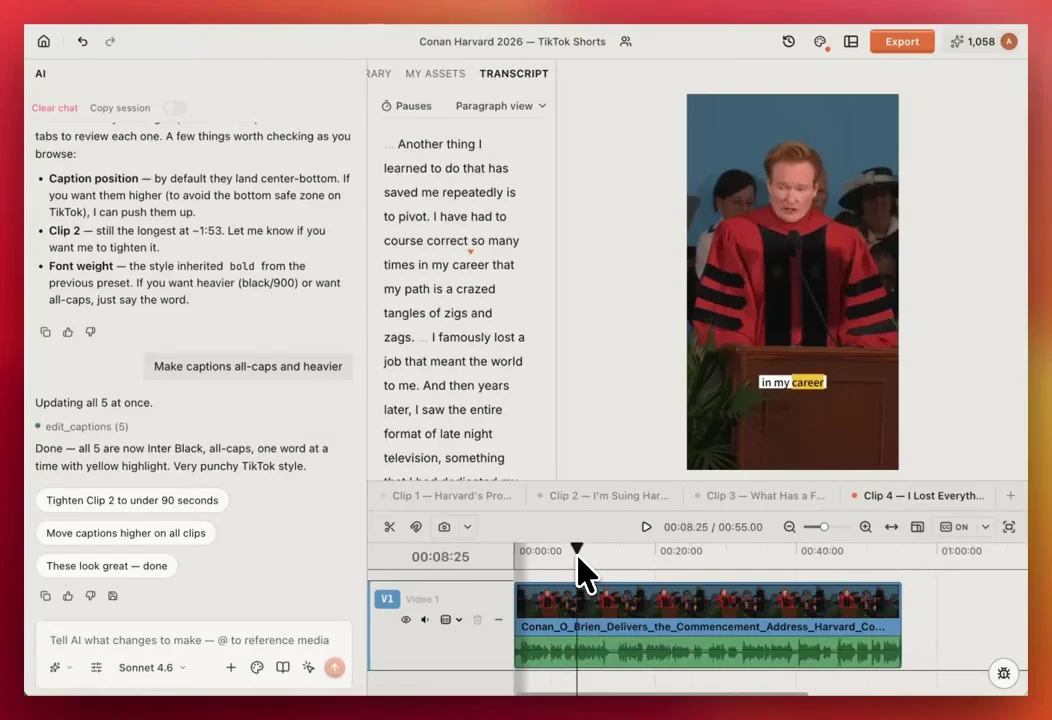
You describe the result (“find five self-contained moments under 60 seconds, vertical, with captions”) and the agent selects the moments, cuts them on separate timelines and adds captions. You can then edit by deleting words in the transcript, apply a caption style such as TikTok Pop, emphasize single words, and change the canvas to 9:16. You can also run the same workflow from Claude Code or Codex through the Agent Plugin.
Why pick it: turning long recordings into a week of Reels takes minutes of review instead of an afternoon of scrubbing, and every cut stays editable.
Watch for: the free plan includes the editor, transcription, captions and up to 60 minutes of cloud exports in total; agent requests and AI generation use credits, and paid plans start at $25 a month for 100 credits. ChatCut Desktop needs macOS 13 or newer or Windows 10 or newer; the web app runs in a desktop browser.
8. VEED: Best for browser-based team editing
VEED is an online editor with captions, translation, brand kits, AI clipping and shared workspaces.
Why pick it: when several people touch every Reel (an editor, a reviewer, a social manager), a browser editor with shared brand settings keeps everyone on the same version.
Watch for: VEED’s own comparison page describes the free plan as 720p exports with a watermark and a ten-minute video limit. Paid plans are billed per seat; confirm the current amounts on its pricing page before you budget.
Also Considered
- Instagram’s built-in editor is fine for a quick trim, text and music on a single clip. Once you need a timeline, captions you can correct, or reusable styles, move to Edits.
- Filmora (mobile) has captions, cutouts, chroma key and effects, but Wondershare notes that free exports are watermarked.
- Splice offers speed ramps, masks and audio mixing, but the clearest offer on its US listing is $9.99 per week, which adds up quickly.
- Adobe Premiere Rush is no longer an option. Adobe ended support on September 30, 2026, though some lists still recommend it.
If You Create From India
India is where many of this page’s readers are, and the app choice is different there. When we checked Apple’s India storefront on November 4, 2026, Edits, VN and InShot were listed and CapCut was not. That makes Edits the default free choice, VN the choice for more control, and Canva the substitute for template-led work.
If you speak in Hindi or switch between Hindi and English, test automatic captions on a real clip of your own voice before you commit. Caption quality on mixed-language speech varies between apps, and we didn’t measure it for this guide.
How to Choose: Four Checks Before You Commit
- Export a 30-second test. Use your real footage and the settings you’ll post with. Check for a watermark on the final file, the resolution, and whether audio and captions survived.
- Test captions on your own voice. Read a sentence with names, numbers and slang. Count the corrections. That number matters more than any feature list.
- Start where your footage lives. Phone clips belong in a phone editor. Hour-long recordings on your computer are faster to cut on your computer.
- Price it per Reel. A $20-a-month app for two Reels a month costs $10 a Reel. If your free editor exports cleanly, the paid features have to save real time.
Turn a Long Recording Into Reels With ChatCut
If your Reels come from podcasts, interviews or long talking-head videos, this prompt is a good first pass. Run it in ChatCut, or in Claude Code or Codex with the ChatCut plugin:
Review each clip for meaning and framing, fix any caption words, and export. The long video to shorts guide walks through the same workflow in more detail.